
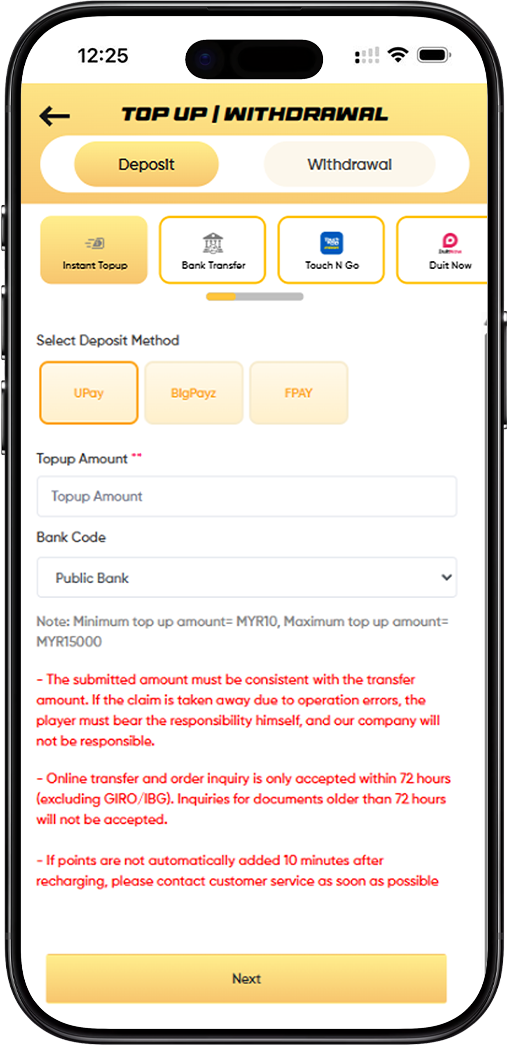
LUCKYTOWN PLUS provides a wide range of deposit channels designed to fit the lifestyle of every Malaysian player. Whether you prefer to fund your account via bank transfer, e-wallet, QR code, or USDT cryptocurrency on the TRC20 network, LUCKYTOWN PLUS makes it straightforward and secure. All LUCKYTOWN PLUS deposits are processed swiftly so you never have to wait long before jumping into your favourite games.
How to Top Up on LUCKYTOWN PLUS: A Step-by-Step Walkthrough
Step 1: Log In and Open the Top Up Section
Sign in to your LUCKYTOWN PLUS account using your registered credentials. Once logged in, locate the "TOP UP / WITHDRAWAL" section from your dashboard or main navigation menu and click "Top Up" to enter the deposit page.
Step 2: Choose Your Preferred Deposit Category
The LUCKYTOWN PLUS deposit page displays several main categories at the top. Browse through and select the category that best matches your intended payment method.
Deposit Categories Available on LUCKYTOWN PLUS
- Instant Topup - Rapid deposits through UPay, BigPayz, or FPAY
- Bank Transfer - Direct transfers from major Malaysian bank accounts
- Touch N Go - Deposits using the Touch N Go e-wallet
- Duit Now - QR-based transfers via the Duit Now system
- USDT (TRC20) - Crypto deposits using Tether on the TRC20 network
Step 3: Pick a Specific Payment Method Within Your Category
After selecting a deposit category on LUCKYTOWN PLUS, you will see individual payment method options. Choose the one that suits you best.
Instant Topup Options via UPay
- UPay - Supports Touch N Go, Boost, GrabPay, ShopeePay, Maybank QR, and DuitNow all under one portal
- BigPayz - A reliable alternative instant deposit provider
- FPAY - Additional instant payment channel for fast crediting
Bank Transfer Options
LUCKYTOWN PLUS accepts bank transfers from all leading Malaysian banks:
- Public Bank
- May Bank
- Cimb Bank
- Hong Leong
- RHB Bank
- AmBank
- Bank Simpanan Nasional
- Bank Islam
Touch N Go and E-Wallet Options
The following e-wallets are supported under this category:
- Touch 'n Go
- Boost
- GrabPay
- ShopeePay
- Maybank QR
Duit Now
Select the Duit Now option to make QR code-based transfers directly through the Duit Now payment network.
USDT (TRC20)
Cryptocurrency deposits are accepted from:
- BINANCE - Transfer from your Binance wallet
- Huobi - Transfer from your Huobi account
- Others - Any other supported USDT wallet or exchange
- Additional Binance and Huobi wallet entries may also appear
Step 4: Key In Your Top Up Amount
Enter your desired deposit amount in the "Topup Amount" field. Every LUCKYTOWN PLUS deposit method comes with its own minimum and maximum limits - make sure your amount falls within the accepted range.
LUCKYTOWN PLUS Deposit Limits by Payment Method
- Instant Topup / UPay / E-Wallets: Minimum RM10, Maximum RM2,500 (select methods up to RM15,000)
- Bank Transfer: Minimum RM20, Maximum RM20,000
- USDT (TRC20): Amount keyed in USDT; estimated MYR equivalent shown based on live exchange rate (e.g. rate 4.12)
Step 5: Read All Important Notices Before Proceeding
LUCKYTOWN PLUS displays critical notices on the deposit page. Please read each one carefully before submitting your top up request.
Registered Name Must Match Payment Account
If the real name submitted for top up does not match the name on the bank or payment account, LUCKYTOWN PLUS reserves the right to reject the deposit application. Always ensure your LUCKYTOWN PLUS account name and payment account name are identical.
Transfer Amount Must Be Exact
The amount transferred must match exactly what was entered in the top up form. If a discrepancy arises due to player error, the player bears full responsibility and LUCKYTOWN PLUS will not be liable for any resulting loss.
Reference Format for Bank Transfers
When making a bank transfer, please include LT- followed by your username in the transfer reference field. For example, if your username is luckytown8, enter: LTluckytown8. This reference is essential for matching your payment to your LUCKYTOWN PLUS account.
Bank Account Details May Change
LUCKYTOWN PLUS may update its receiving bank account details periodically. Always verify that you have the latest account information before initiating a transfer. The company is not responsible for payments made to outdated account details.
Prohibited Words in Transfer Remarks
To avoid deposit delays or rejection, do not include the following terms in your transfer remarks: Sales / Purchases, Rent / Loan, Telecommunication station, Currency exchange, Medical supplies, Clothing supply, Electronic products, Transportation, Car parts, Motor parts, Luxury / Famous brand, Concert tickets / Coupons, Foods / Snacks / Fruits / Drinks / Books, or similar terms. Deposits containing these words will be subjected to a stricter review process.
QR Code Validity and Usage Rules
All QR code top up requests and inquiries are only valid within 48 hours of generation. Any submission beyond this window will not be processed. Players must never save or reuse a QR code - always generate a fresh QR for every transaction. Using a saved or expired QR during a maintenance period will result in the deposit being unrecoverable.
USDT Deposit Order Rules
LUCKYTOWN PLUS processes USDT top ups on a strict first-come-first-served basis. Only the first player to submit an order for a particular wallet address will have their transaction recognised. If a transfer is made but the order is not submitted within 30 minutes, the transaction will be deemed invalid. All timing is determined by the timestamp shown in the LUCKYTOWN PLUS platform wallet.
Crediting Time Expectation
Under normal conditions, LUCKYTOWN PLUS credits your account within 10 minutes of a completed deposit. If your balance has not been updated after 10 minutes, contact LUCKYTOWN PLUS customer support immediately with your receipt or transaction proof.
Step 6: Confirm and Finalise Your Top Up
Once your amount is entered and all notices reviewed, click the "Next" button to proceed. The next steps vary based on your chosen deposit method.
Completing a Bank Transfer Deposit
LUCKYTOWN PLUS will display the receiving bank account details. Copy them carefully, complete the transfer from your banking app, then return to the LUCKYTOWN PLUS top up page to upload your transfer receipt for processing.
Completing a QR Code Deposit
A unique QR code will be generated for your transaction. Open your e-wallet app, scan the QR, and complete the payment. The system will attempt automatic crediting; you may also be prompted to upload a payment screenshot.
Completing a USDT Deposit
LUCKYTOWN PLUS will display a USDT wallet address for your deposit. Send the precise USDT amount from your exchange or crypto wallet, then submit your transaction ID (TXID) on the platform for verification and crediting.
In-Depth Overview of Each LUCKYTOWN PLUS Deposit Method
Instant Topup with UPay, BigPayz, and FPAY
For players who want the fastest possible credit time, LUCKYTOWN PLUS instant topup channels are the go-to choice. UPay consolidates popular e-wallets including Touch N Go, Boost, GrabPay, ShopeePay, Maybank QR, and DuitNow under a single gateway. BigPayz and FPAY serve as backup instant options. Deposit limits for instant topup range from RM10 to RM2,500, with some methods reaching RM15,000.
Bank Transfer Deposits on LUCKYTOWN PLUS
LUCKYTOWN PLUS bank transfers accommodate the highest deposit limits available on the platform - from RM20 up to RM20,000 per transaction. This method supports all major Malaysian banks. Remember to include your LT-username reference in the remarks field and upload your receipt promptly after transferring to ensure timely crediting.
Touch N Go and E-Wallet Top Up
Touch N Go and supported e-wallets (Boost, GrabPay, ShopeePay, Maybank QR) allow convenient QR-based deposits with limits of RM10 to RM2,500. Each QR is unique and single-use - never save or screenshot a QR for future use. All QR transfers must be completed and queries raised within 48 hours of generation.
Duit Now Top Up on LUCKYTOWN PLUS
Duit Now QR deposits operate under the same framework as Touch N Go - quick, scan-and-pay convenience with a deposit range of RM10 to RM2,500. It is accessible via UPay and other supported providers within the LUCKYTOWN PLUS platform.
USDT TRC20 Cryptocurrency Top Up
LUCKYTOWN PLUS supports USDT deposits exclusively on the TRC20 network. The current exchange rate is displayed on the deposit page (e.g. 4.12 MYR per USDT) so you can see your estimated MYR credit before committing. Note: only the first submitted order per wallet address is valid, and orders must be submitted within 30 minutes of the transfer.
LUCKYTOWN PLUS Deposit Rules and Compliance Summary
Universal Rules Across All Deposit Methods
- Payment account name must match LUCKYTOWN PLUS registered name
- Transfer amount must precisely equal the submitted amount
- Bank transfer remarks must include the LT-username reference
- Prohibited keywords in remarks will trigger additional review
- Funds not credited within 10 minutes - contact customer support immediately
QR Code Deposit Rules
- Inquiries and QR validity window: 48 hours only
- Never save, screenshot, or reuse a QR code
- QR used during maintenance period may result in unrecoverable funds
USDT TRC20 Deposit Rules
- First-come-first-served order submission system
- Order must be submitted within 30 minutes of wallet transfer
- Platform wallet time is the sole reference for timing disputes
LUCKYTOWN PLUS Top Up FAQs
What Is the Minimum Deposit on LUCKYTOWN PLUS?
The LUCKYTOWN PLUS minimum deposit is RM10 for instant topup, e-wallets, Touch N Go, and Duit Now. Bank transfers carry a minimum of RM20. USDT deposits are entered in USDT with the MYR equivalent shown live on the deposit page.
What Is the Maximum Amount I Can Deposit?
LUCKYTOWN PLUS maximum deposit limits vary by method: RM2,500 for most QR and e-wallet methods, RM15,000 for select instant topup channels, and RM20,000 for bank transfers.
How Quickly Will My LUCKYTOWN PLUS Deposit Be Credited?
LUCKYTOWN PLUS aims to credit all deposits within 10 minutes. If your balance is not updated within that window, reach out to LUCKYTOWN PLUS customer support with your payment proof for a swift resolution.
What Should I Do If I Transferred the Wrong Amount?
The submitted and transferred amounts on LUCKYTOWN PLUS must be identical. If you have transferred an incorrect amount, stop the process and contact LUCKYTOWN PLUS customer service immediately. Do not attempt a second transfer before getting guidance.
Can I Deposit Using Another Person's Bank Account or E-Wallet?
No. LUCKYTOWN PLUS strictly requires that the name on your payment method matches your registered account name. Deposits from third-party accounts will be rejected regardless of the reason.
Why Did My Top Up Get Rejected Due to Transfer Remarks?
LUCKYTOWN PLUS monitors transfer remarks for certain flagged keywords such as sales, rent, or currency exchange. If any prohibited term is detected, your deposit will be subjected to a stricter review and may be declined. Use only neutral language or the required LT-username reference format.
Why LUCKYTOWN PLUS Is the Trusted Deposit Platform for Malaysian Players
LUCKYTOWN PLUS stands out as a preferred online gaming platform in Malaysia because of its diverse, player-friendly deposit ecosystem. From traditional bank transfers to cutting-edge USDT cryptocurrency options, LUCKYTOWN PLUS covers every payment preference. Clear deposit rules, transparent limits, and real-time crediting ensure that every LUCKYTOWN PLUS player can top up with full confidence. Our built-in fraud prevention guidelines and strict name-matching policy are in place to protect your funds at every step.
Fund Your LUCKYTOWN PLUS Account and Start Playing Today
Your LUCKYTOWN PLUS balance is just minutes away. Pick from Instant Topup, Bank Transfer, Touch N Go, Duit Now, or USDT TRC20 - then follow our step-by-step guide, review all deposit notices, and complete your top up in no time. Log in now to begin, or register your LUCKYTOWN PLUS account today using your Malaysia phone number.
Top Up LUCKYTOWN PLUS Now